
FOMEI LED DMX 600B Studio Light - PhotoRobot Gebruikersgids
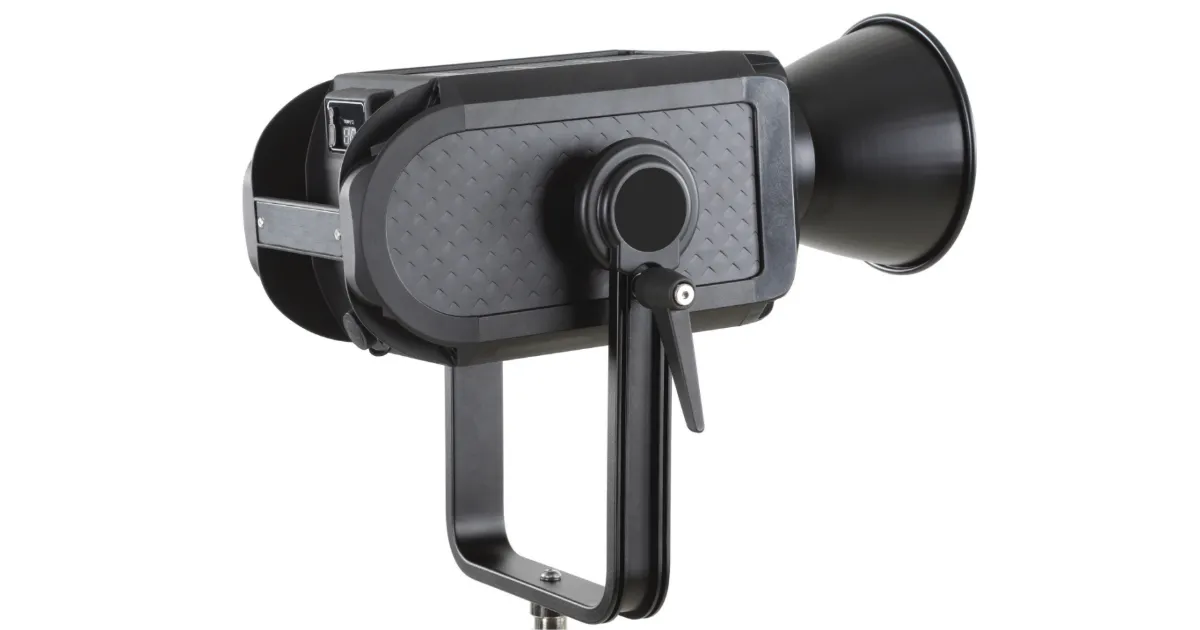
Die FOMEI LED DMX 600B - PhotoRobot Gebruikersgids het ten doel om PhotoRobot-kliënte te ondersteun in die werking van hul lig met PhotoRobot. Hierdie inligting sluit instruksies in vir die werking van die FOMEI LED DMX 600B studio-lig, asook stappe vir die aanvanklike opstelling van hul toestel.
Let wel: Hierdie gebruikershandleiding is 'n reproduksie van amptelike dokumentasie deur die vervaardiger vir die FOMEI LED DMX 600B. Verwys na die vervaardiger se webwerf fomei.com vir die amptelike dokumentasie oor jou spesifieke produk. Maak ook seker dat jy enige dokumentasie lees wat spesifiek saam met jou toestel voorsien word voor die eerste gebruik.
Belangrik: Maak seker dat die produk heel is en dat daar geen onderdele ontbreek voor gebruik nie. Moet nie self die eenheid oopmaak of herstel nie. As daar enige gebrek is, kontak asseblief FOMEI direk. Vir waarborg- en instandhoudingsinligting van FOMEI-produkte, verwys na die dokumentasie wat spesifiek vir jou toestel verskaf is.
Waarskuwings voor gebruik
Let op die volgende waarskuwings voor gebruik:
- Maak seker dat die produk heel is en dat daar geen onderdele ontbreek nie.
- In geval van skade, kontak 'n professionele diensverteenwoordiger van FOMEI.
- Wanneer jy die produk gebruik, maak seker die omgewing is droog en geventileer.
- Vir optimale prestasie, maak die produk gereeld skoon met 'n skoon lap.
- Moet nie krap of druk op die produk uitoefen nie.
Veiligheidswaarskuwings
Maak seker om die veiligheidswaarskuwings te volg:
- Moet nie jou LED-eenheid gebruik in 'n omgewing waar vog waarskynlik met die eenheid in aanraking kom nie.
- Moet nie die produk uitmekaar haal nie. In geval van skade, kontak 'n FOMEI-diensverteenwoordiger, of 'n kontraktuele diens van opgeleide professionele persone.
- As die produk uitmekaar gehaal word, val dit nie onder waarborg nie.
- Moet die produk nie in uiterste temperature gebruik nie (+50° C)
- Die produk is nie geskik vir kinders nie.
- Moet nie die toestel inprop of ontkoppel terwyl die krag nog gekoppel is nie.
- Moet nie lig meer as nodig benadeel nie.
- Moet nie luguitlate beperk terwyl dit gebruik word nie.
- Let daarop dat 'n brandgevaar bestaan as brandbare materiale naby geplaas word wanneer die eenheid in gebruik is.
- Vermy om kabels te plaas waar dit gevaarlik kan wees.
- Hou dit buite bereik van kinders.
Herwinnings- en inligtingsetikette
Hierdie produk bevat elektroniese onderdele. Moet nie die produk saam met algemene afval weggooi nie, maar neem dit eerder na 'n elektroniese herwinningsfasiliteit. Asseblief, beskerm ons planeet.
Die inligtingsetiket met die deurgestreepte houer beteken dat binne die Europese Unie, die produk:
- Moet afsonderlik ingesamel word ooreenkomstig toepaslike regulasies oor elektroniese afval aan die einde van sy leeftyd.
- Dit geld vir die toestel en vir alle bykomstighede wat met hierdie simbool gemerk is.
- Moet nie hierdie produkte as ongesorteerde munisipale afval weggooi nie.

PhotoRobot - FOMEI LED DMX 600B Gebruikersgids
Die inhoud van hierdie gebruikersgids tot die FOMEI LED DMX 600B bestaan uit die volgende afdelings, in volgorde.
- Oor: FOMEI GELEI DMX 600B
- Beheer
- Ligbeheer
- Tegniese Inligting
1. Oor: FOMEI LED DMX 600B Studio Light
Die FOMEI LED DMX 600B is 'n professionele ateljee-lig met 'n maksimum uitset van 600W / 5600K, geskik vir professionele ateljeegebruik vir video en fotografie. Die krag van die toestel loop direk van die netwerk af, en daar is inset en uitset vir beide bedrade en draadlose DMX-protokol. Dit maak dat die lig selfs in groot produksies geskik is. Die lig het beheer óf via die geïntegreerde skerm met 'n intuïtiewe scrollwiel, óf via die mobiele app.
Die pakket van die LED DMX 600B bevat die volgende hoofkomponente.
- Lig
- Beheer Eenheid
- Reflektor
- Kragkoord
- Vervoersaak
2. Beheer
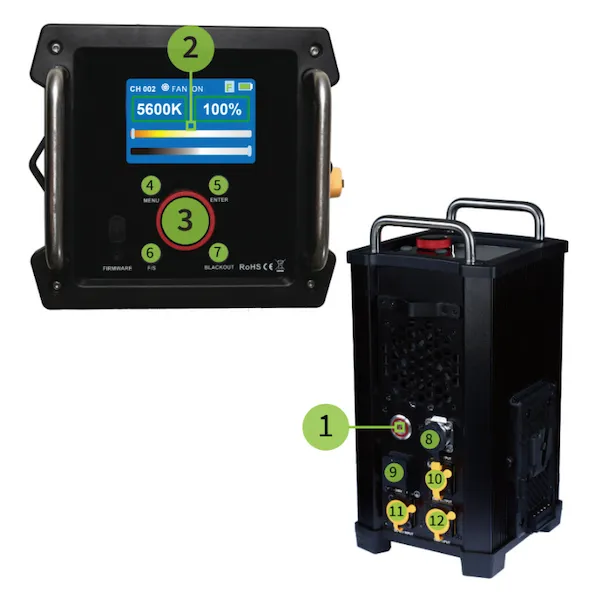
- AAN/AF-knoppie
- Wys
- Beheerroller
- MENU-knoppie
- ENTER-knoppie
- Rolspoed
- BLACKOUT-knoppie
- GS-uitset
- AC-inset
- DMX-uitset
- GS-invoer
- DMX-invoer
3. Ligbeheer
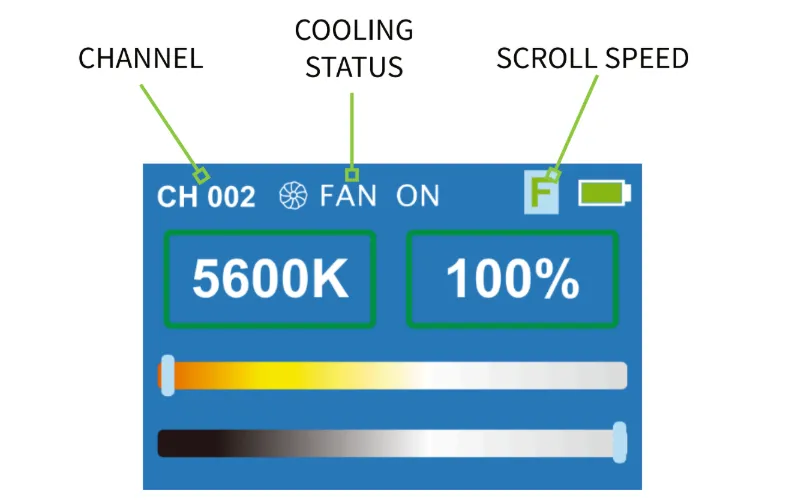
Die FOMEI LED DMX 600B verskaf ligbeheer via die skerm. Nadat die lig aangeskakel is, verskyn die eerste kieslys. Terselfdertyd wys die boonste balk van die skerm die huidige kanaal (links), Verkoelingsstatus (middel), en Beheerspoed (regs).
Hoofkieslys
Wanneer die lig AAN is, maak die hoofkieslys die aanpassing van die ligintensiteit moontlik. Gebruik die rolroller om die ligintensiteit van 0-100% aan te pas. Om vinniger of meer presiese beheer moontlik te maak, gebruik die Scroll Speed-knoppie om die scrollspoed aan te pas. Die roller-rolspoed word in die boonste balk van die skerm aangedui (F: met 10 punte, S: met 1 punt).
Beligtingseffekte
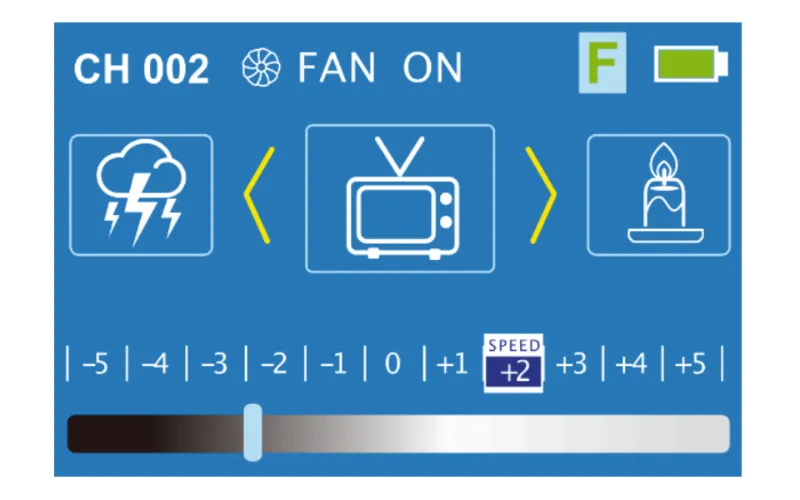
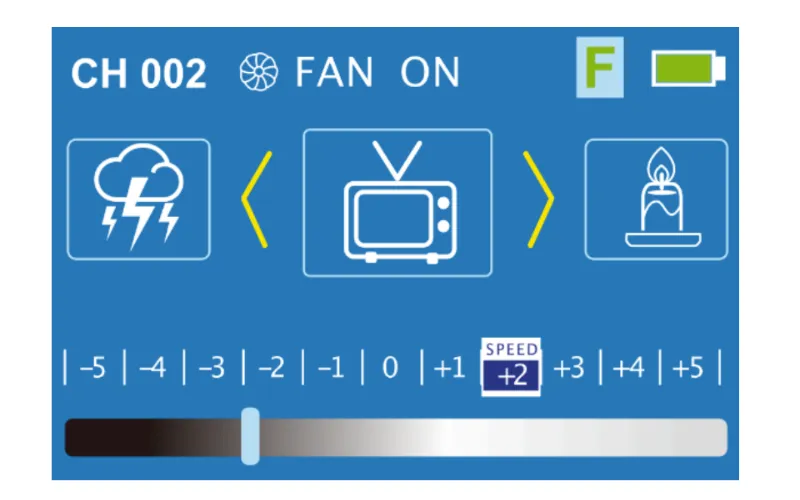
Vanaf die hoofkieslys, druk die MENU-knoppie om oor te skakel na die kieslys vir die beligtingseffekte. Om die beligtingseffekte aan te pas, draai die knop om 'n spesifieke beligtingseffek te kies, en gebruik die ENTER-knoppie om die effek te kies en die spoed daarvan te verander. Druk weer ENTER om die intensiteit van die gewenste effek aan te pas.
BT-verbinding Herstel
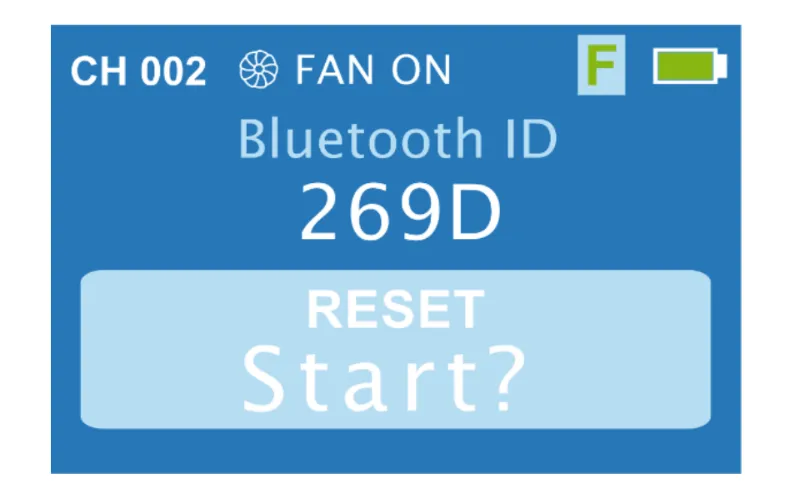
Toegang tot die Bluetooth-instellings deur die MENU-knoppie te druk om na die kieslys met "Bluetooth ID" bo-aan oor te skakel. Druk dan ENTER op die vraagteken ("?"), en draai die knop om "JA" te kies. Daarna verander die vertoonveld na "Start?" om aan te dui dat die Bluetooth-verbinding teruggestel is.
Kanaalspyskaart
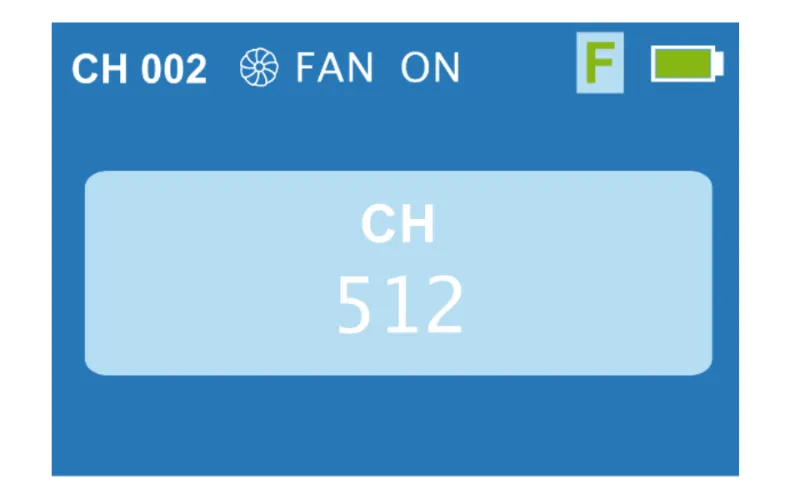
Gebruik die MENU-knoppie om na die kieslys te verander om die DMX-kanaal te verander, en draai die beheerroller om die DMX-kanaal van 1 - 512 te verander.
Afkoelspyskaart
Die verkoelingskieslys laat beheer oor die verkoeling van die lig toe deur die beheerrol na AAN of AF te draai. Let wel: Nadat aktiewe verkoeling afgeskakel is, word dit aanbeveel om die temperatuur van die lig te kontroleer. Om die ligtemperatuur te kontroleer, inspekteer die skerm wat op die liggaam van die lig self geleë is.
Draadlose DMX-kieslys
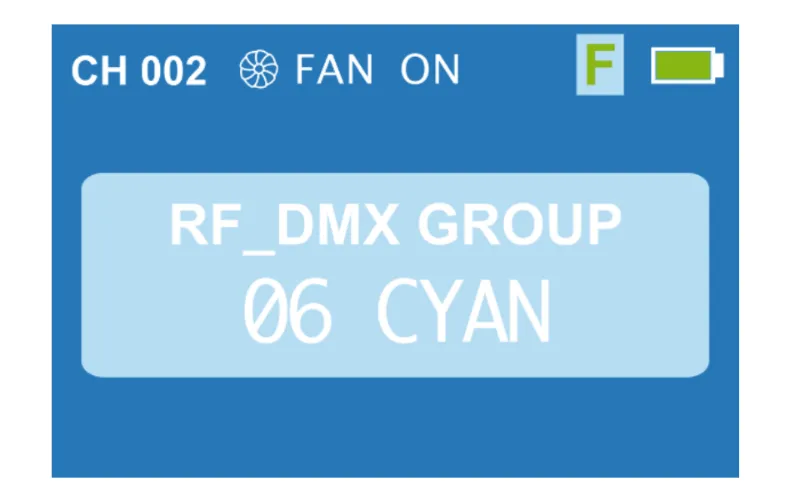
Die kieslys vir die draadlose DMX-modus bevat 7 groepe (Rooi, Groen, Geel, Blou, Pers, Siaan, Wit). Elke groep bevat dan 512 kanale. Stel die DMX-sender op dieselfde parameters as die lig. Dan, na ongeveer 2 minute, is die verbinding voltooi.
BLACKOUT-funksie
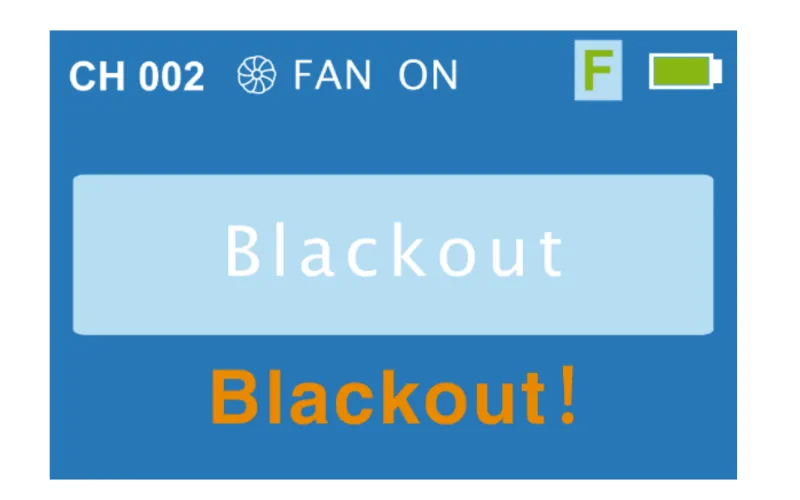
Gebruik die BLACKOUT-knoppie om alle aktiewe ligfunksies af te skakel. Druk BLACKOUT nog een keer om funksies te herstel.
Beheer via App
Nadat jy die Bluetooth-sein op die FOMEI LED DMX 600B herstel het, koppel aan die toestel op jou selfoon via Bluetooth deur die Desal Lite+-app wat op jou foon afgelaai is. In die app, druk die plus ("+") simbool regs bo, en druk "Voeg toestel by" om na ligte te soek. Wanneer een gevind word, druk weer die plus-simbool om die lig by te voeg. Dit is nou moontlik om die app te gebruik vir beheer oor die intensiteit van die lig, die lig-toneel, en om die lig met musiek te sinkroniseer.
Desal Lite+ App Aflaai
Die Desal Lite+ App vir beheer van die FOMEI LED DMX 600B is beskikbaar om af te laai op iOS en Android. Vind die APK-aflaai vir Android op fomei.com of gebruik die QR-kode hieronder vir vinnige aflaai op Android of iOS.

4. Tegniese Inligting
Die tegniese spesifikasies van die FOMEI LED DMX 600B studio-lig word in die volgende Tegniese Inligtingstabel en DMX-tabel getoon.
FOMEI-maatskappyinligting en kontak
Die maatskappy FOMEI s.r.o. is geregistreer by die adres: Machkova 587, Hradec Kralove 500 11, Tsjeggiese Republiek.
Stuur 'n e-pos aan sls@fomei.com vir algemene navrae, of om te servis@fomei.com vir diensversoeke.
Telefoon: +420 495 056 505
Laaste Notas
Dit is 'n reproduksie van die amptelike FOMEI LED DMX 600B-gebruikershandleiding, wat ook beskikbaar is in 'n aflaaibare PDF-weergawe op fomei.com. Vir diensinligting, verwys na die dokumentasie wat spesifiek saam met jou toestel verskaf is, of na die FOMEI-diensafdeling vir onmiddellike ondersteuning.


EOS Rebel-reeks


EOS DSLR-reeks


EOS M spieëllose reeks


PowerShot-reeks


Close-up / Handheld

Die Canon EOS Rebel-reeks bied beginnersvriendelike DSLR-kameras met soliede beeldkwaliteit, intuïtiewe kontroles en veelsydige kenmerke. Hierdie kameras is ideaal vir fotografie-entoesiaste en bied betroubare outofokus, wisselhoekige raakskerms en Full HD- of 4K-video-opname.
Verbinding
Resolusie (MP)
Resolusie
Die Canon EOS DSLR-reeks lewer beelde van hoë gehalte, vinnige outofokus en veelsydigheid, wat dit ideaal maak vir beide fotografie en videoproduksie.
Verbinding
Resolusie (MP)
Resolusie
Die Canon EOS M Mirrorless-reeks kombineer kompakte ontwerp met DSLR-agtige werkverrigting. Met verwisselbare lense, vinnige outofokus en beeldsensors van hoë gehalte, is hierdie kameras ideaal vir reisigers en inhoudskeppers wat draagbaarheid soek sonder om beeldkwaliteit in te boet.
Verbinding
Resolusie (MP)
Resolusie
Die Canon PowerShot-reeks bied kompakte, gebruikersvriendelike kameras vir toevallige skuts en entoesiaste. Met modelle wat wissel van eenvoudige wys-en-skiet tot gevorderde zoomkameras, bied hulle gerief, soliede beeldkwaliteit en kenmerke soos beeldstabilisering en 4K-video.
Verbinding
Resolusie (MP)
Resolusie
Die Canon Close-Up & Handheld Cameras is ontwerp vir gedetailleerde, nabye fotografie en video. Kompak en maklik om te gebruik, hulle bied presisiefokus, hoë-resolusie-beelding en veelsydige makro-vermoëns - perfek vir vlogging, produkfotografie en kreatiewe nabyskote.


